
-
×
 Advanced Spread Trading with Guy Bower - MasterClass Trader
1 × $15.00
Advanced Spread Trading with Guy Bower - MasterClass Trader
1 × $15.00 -
×
 Market Mindfields - 2 DVDs with Ryan Litchfield
1 × $6.00
Market Mindfields - 2 DVDs with Ryan Litchfield
1 × $6.00 -
×
 Crypto Trading Academy with Cheeky Investor - Aussie Day Trader
1 × $13.00
Crypto Trading Academy with Cheeky Investor - Aussie Day Trader
1 × $13.00 -
×
 Monthly Newsletter 99-01 with Elliott Wave Theorist
1 × $6.00
Monthly Newsletter 99-01 with Elliott Wave Theorist
1 × $6.00 -
×
 HYDRA 3 Day Bootcamp
1 × $5.00
HYDRA 3 Day Bootcamp
1 × $5.00 -
×
 Nasdaq Scalper Complete Video Course with Vadym Graifer - RealityTrader
1 × $23.00
Nasdaq Scalper Complete Video Course with Vadym Graifer - RealityTrader
1 × $23.00 -
×
 International Mergers & Acquisitions Activity Since 1990 with Greg Gregoriou & Luc Renneboog
1 × $6.00
International Mergers & Acquisitions Activity Since 1990 with Greg Gregoriou & Luc Renneboog
1 × $6.00 -
×
 The Best Option Trading Course with David Jaffee - Best Stock Strategy
1 × $15.00
The Best Option Trading Course with David Jaffee - Best Stock Strategy
1 × $15.00 -
×
 SQX Mentorship with Tip Toe Hippo
1 × $23.00
SQX Mentorship with Tip Toe Hippo
1 × $23.00 -
×
 The Right Stock at the Right Time. Prospering in the Coming Good Years with Larry Williams
1 × $6.00
The Right Stock at the Right Time. Prospering in the Coming Good Years with Larry Williams
1 × $6.00 -
×
 Best of the Best: Collars with Amy Meissner & Scott Ruble
1 × $15.00
Best of the Best: Collars with Amy Meissner & Scott Ruble
1 × $15.00 -
×
 The BULLFx Forex Trading Course
1 × $5.00
The BULLFx Forex Trading Course
1 × $5.00 -
×
 Low Stress Options Trading with Low Stress Training
1 × $23.00
Low Stress Options Trading with Low Stress Training
1 × $23.00 -
×
 Strategy Spotlight Series
1 × $15.00
Strategy Spotlight Series
1 × $15.00 -
×
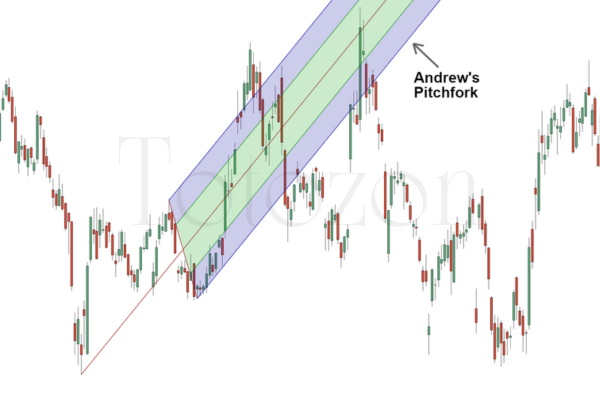 Andrews Pitchfork Basic
1 × $6.00
Andrews Pitchfork Basic
1 × $6.00 -
×
 Short and Simple Guide to Smart Investing with Alan Lavine
1 × $6.00
Short and Simple Guide to Smart Investing with Alan Lavine
1 × $6.00 -
×
 Cyber Trading University - Power Trading 7 CD
1 × $8.00
Cyber Trading University - Power Trading 7 CD
1 × $8.00 -
×
 The Aime Workshop with Clay Marafiote
1 × $6.00
The Aime Workshop with Clay Marafiote
1 × $6.00 -
×
 Get More Leads Quickly with Brittany Lynch
1 × $6.00
Get More Leads Quickly with Brittany Lynch
1 × $6.00 -
×
 Master NFTs in 7 Days with Ben Yu
1 × $23.00
Master NFTs in 7 Days with Ben Yu
1 × $23.00 -
×
 $20 – 52k 20 pips a day challange with Rafał Zuchowicz - TopMasterTrader
1 × $5.00
$20 – 52k 20 pips a day challange with Rafał Zuchowicz - TopMasterTrader
1 × $5.00 -
×
 Quantamentals - The Next Great Forefront Of Trading and Investing with Trading Markets
1 × $8.00
Quantamentals - The Next Great Forefront Of Trading and Investing with Trading Markets
1 × $8.00 -
×
 Momentum Signals Training Course with Fulcum Trader
1 × $5.00
Momentum Signals Training Course with Fulcum Trader
1 × $5.00 -
×
 Matrix Spread Options Trading Course with Base Camp Trading
1 × $31.00
Matrix Spread Options Trading Course with Base Camp Trading
1 × $31.00 -
×
 Home Run Options Trading Course with Dave Aquino - Base Camp Trading
1 × $11.00
Home Run Options Trading Course with Dave Aquino - Base Camp Trading
1 × $11.00 -
×
 The Ultimate Trading Guide & Code with George Pruitt, John R.Hill
1 × $6.00
The Ultimate Trading Guide & Code with George Pruitt, John R.Hill
1 × $6.00 -
×
 The A14 Weekly Option Strategy Workshop with Amy Meissner
1 × $23.00
The A14 Weekly Option Strategy Workshop with Amy Meissner
1 × $23.00 -
×
 Trading Short TermSame Day Trades Sep 2023 with Dan Sheridan & Mark Fenton - Sheridan Options Mentoring
1 × $31.00
Trading Short TermSame Day Trades Sep 2023 with Dan Sheridan & Mark Fenton - Sheridan Options Mentoring
1 × $31.00 -
×
 Hot Trading Investing Strategy: ETF and Futures with QSB Funds
1 × $6.00
Hot Trading Investing Strategy: ETF and Futures with QSB Funds
1 × $6.00 -
×
 Learn To Fish Part III - How To Swing Trade for Consistent Gains with Daniel
1 × $15.00
Learn To Fish Part III - How To Swing Trade for Consistent Gains with Daniel
1 × $15.00 -
×
 The GBP USD Trading System with A.Heuscher
1 × $6.00
The GBP USD Trading System with A.Heuscher
1 × $6.00 -
×
 Trading With DiNapoli Levels
1 × $6.00
Trading With DiNapoli Levels
1 × $6.00 -
×
 The Orderflows Trade Opportunities Encyclopedia with Michael Valtos
1 × $8.00
The Orderflows Trade Opportunities Encyclopedia with Michael Valtos
1 × $8.00 -
×
 Offensive & Defensive Strengths of Stocks, Groups & Sectors Gary Anderson
1 × $6.00
Offensive & Defensive Strengths of Stocks, Groups & Sectors Gary Anderson
1 × $6.00 -
×
 ICT Prodigy Trading Course – $650K in Payouts with Alex Solignani
1 × $15.00
ICT Prodigy Trading Course – $650K in Payouts with Alex Solignani
1 × $15.00 -
×
 White Phoenix’s The Smart (Money) Approach to Trading with Jayson Casper
1 × $39.00
White Phoenix’s The Smart (Money) Approach to Trading with Jayson Casper
1 × $39.00
TTM Trend Anchor Indicator for Tradestation & MultiCharts
$6.00
File Size: Coming soon!
Delivery Time: 1–12 hours
Media Type: Online Course
TTM Trend Anchor Indicator for Tradestation & MultiCharts
In the world of trading, having the right tools can make a significant difference in your success. One such tool is the TTM Trend Anchor Indicator. This powerful indicator is available for both Tradestation and MultiCharts, providing traders with a robust method for identifying and capitalizing on market trends. In this article, we will delve into the features, benefits, and practical applications of the TTM Trend Anchor Indicator.
Introduction to the TTM Trend Anchor Indicator
What is the TTM Trend Anchor Indicator?
The TTM Trend Anchor Indicator is a technical analysis tool designed to help traders identify the direction and strength of market trends. Developed by John Carter, this indicator is part of the TTM suite of tools, known for their effectiveness in enhancing trading strategies.
Why Use the TTM Trend Anchor Indicator?
This indicator simplifies the process of trend identification, allowing traders to make more informed decisions. It is particularly useful for those trading on Tradestation and MultiCharts platforms, offering seamless integration and ease of use.
Core Features of the TTM Trend Anchor Indicator
Color-Coded Signals
The indicator uses color-coded signals to represent different market conditions:
- Green Bars: Indicate a strong uptrend.
- Red Bars: Indicate a strong downtrend.
- Blue Bars: Indicate a neutral or sideways market.
Customizable Settings
Traders can customize the settings to suit their trading style and preferences. This includes adjusting the sensitivity of the indicator to better align with specific market conditions.
Real-Time Analysis
The TTM Trend Anchor Indicator provides real-time analysis, allowing traders to react swiftly to market changes and capitalize on emerging trends.
Benefits of Using the TTM Trend Anchor Indicator
Enhanced Trend Identification
By providing clear and easy-to-understand signals, the TTM Trend Anchor Indicator helps traders quickly identify the direction of the trend, reducing the risk of making trades against the market direction.
Improved Decision Making
With accurate trend information at their fingertips, traders can make better-informed decisions, leading to potentially higher profits and reduced losses.
Versatility Across Markets
The indicator is versatile and can be used across various markets, including stocks, forex, commodities, and futures. This makes it a valuable tool for traders in different market segments.
Setting Up the TTM Trend Anchor Indicator
For Tradestation Users
- Download and Install: Ensure you have the TTM Trend Anchor Indicator downloaded and installed on your Tradestation platform.
- Apply to Chart: Open your chart, go to the indicator section, and apply the TTM Trend Anchor Indicator.
- Adjust Settings: Customize the settings as per your trading strategy.
For MultiCharts Users
- Download and Install: Similar to Tradestation, download and install the indicator on your MultiCharts platform.
- Add to Chart: Apply the indicator to your desired chart.
- Customize Settings: Modify the settings to match your trading style and market conditions.
Practical Applications of the TTM Trend Anchor Indicator
Identifying Entry and Exit Points
The color-coded signals make it easy to identify optimal entry and exit points. For instance, entering a trade when the bars turn green and exiting when they turn red can be a straightforward strategy.
Trend Confirmation
Use the indicator to confirm trends identified through other analysis methods. This double-checking process can increase the accuracy of your trades.
Combining with Other Indicators
For more robust trading strategies, combine the TTM Trend Anchor Indicator with other indicators such as moving averages, RSI, or MACD.
Advanced Strategies Using the TTM Trend Anchor Indicator
Swing Trading
Swing traders can use the indicator to identify short- to medium-term trends, entering and exiting trades based on the color changes of the bars.
Day Trading
Day traders can benefit from the real-time analysis provided by the indicator, making quick decisions to capitalize on intraday price movements.
Position Trading
Position traders can use the TTM Trend Anchor Indicator to confirm long-term trends and maintain their positions accordingly.
Common Challenges and Solutions
False Signals
Like any indicator, the TTM Trend Anchor Indicator can sometimes produce false signals. To mitigate this, combine it with other indicators or use additional analysis methods for confirmation.
Over-Optimization
Avoid over-optimizing the indicator settings. While customization is beneficial, excessively tweaking the settings can lead to unreliable results.
Market Conditions
The effectiveness of the indicator can vary based on market conditions. It’s essential to understand the current market environment and adjust your strategy accordingly.
Conclusion
The TTM Trend Anchor Indicator is a powerful tool for traders using Tradestation and MultiCharts. By providing clear, real-time signals, it helps traders identify and capitalize on market trends more effectively. Whether you are a day trader, swing trader, or position trader, incorporating this indicator into your trading strategy can enhance your decision-making process and improve your trading outcomes.
FAQs
1. How do I install the TTM Trend Anchor Indicator on Tradestation?
Download the indicator, install it on your Tradestation platform, apply it to your chart, and adjust the settings to fit your trading strategy.
2. Can the TTM Trend Anchor Indicator be used for forex trading?
Yes, the indicator is versatile and can be used across various markets, including forex.
3. What do the different colored bars mean?
Green bars indicate a strong uptrend, red bars indicate a strong downtrend, and blue bars indicate a neutral or sideways market.
4. How can I reduce false signals from the indicator?
Combine the TTM Trend Anchor Indicator with other indicators or analysis methods to confirm trends and reduce false signals.
5. Is the TTM Trend Anchor Indicator suitable for beginners?
Yes, the indicator is user-friendly and provides clear signals, making it suitable for both beginners and experienced traders.
Be the first to review “TTM Trend Anchor Indicator for Tradestation & MultiCharts”
You must be logged in to post a review.
Related products
Forex Trading
The Complete Guide to Multiple Time Frame Analysis & Reading Price Action with Aiman Almansoori
Original price was: $1,399.00.$13.00Current price is: $13.00.
Forex Trading
Original price was: $697.00.$5.00Current price is: $5.00.

Forex Trading
Original price was: $249.00.$15.00Current price is: $15.00.
Original price was: $1,849.00.$15.00Current price is: $15.00.
Forex Trading
Quantamentals – The Next Great Forefront Of Trading and Investing with Trading Markets
Original price was: $1,495.00.$8.00Current price is: $8.00.

Forex Trading
Original price was: $2,995.00.$31.00Current price is: $31.00.
Original price was: $997.00.$8.00Current price is: $8.00.
Forex Trading
Original price was: $500.00.$5.00Current price is: $5.00.
Original price was: $895.00.$15.00Current price is: $15.00.
Original price was: $695.00.$41.00Current price is: $41.00.

Forex Trading
Original price was: $499.00.$15.00Current price is: $15.00.
Original price was: $2,120.00.$15.00Current price is: $15.00.

Original price was: $1,800.00.$54.00Current price is: $54.00.
Original price was: $299.00.$8.00Current price is: $8.00.
Original price was: $700.00.$39.00Current price is: $39.00.
Forex Trading
Original price was: $239.00.$8.00Current price is: $8.00.
Original price was: $497.00.$31.00Current price is: $31.00.

Forex Trading
Original price was: $799.00.$15.00Current price is: $15.00.
Original price was: $450.00.$23.00Current price is: $23.00.

Forex Trading
Original price was: $850.00.$23.00Current price is: $23.00.

Reviews
There are no reviews yet.