
-
×
 ADR Pro For Metatrader 4.0 with Compass FX
1 × $15.00
ADR Pro For Metatrader 4.0 with Compass FX
1 × $15.00 -
×
 Forex Secrets Exposed
1 × $15.00
Forex Secrets Exposed
1 × $15.00 -
×
 Equity Trader 101 Course with KeyStone Trading
1 × $6.00
Equity Trader 101 Course with KeyStone Trading
1 × $6.00 -
×
 The Adventures of the Cycle Hunter. The Analyst with Craig Bttlc
1 × $6.00
The Adventures of the Cycle Hunter. The Analyst with Craig Bttlc
1 × $6.00 -
×
 Profiting In Bull Or Bear Markets with George Dagnino
1 × $6.00
Profiting In Bull Or Bear Markets with George Dagnino
1 × $6.00 -
×
 Computational Financial Mathematics with Mathematica
1 × $6.00
Computational Financial Mathematics with Mathematica
1 × $6.00 -
×
 The Raptor 10 Momentum Methodology Course
1 × $6.00
The Raptor 10 Momentum Methodology Course
1 × $6.00 -
×
 TradeCraft: Your Path to Peak Performance Trading By Adam Grimes
1 × $15.00
TradeCraft: Your Path to Peak Performance Trading By Adam Grimes
1 × $15.00 -
×
 Financial Astrology Course with Brian James Sklenka
1 × $6.00
Financial Astrology Course with Brian James Sklenka
1 × $6.00 -
×
 The 4 Horsemen CD with David Elliott
1 × $6.00
The 4 Horsemen CD with David Elliott
1 × $6.00 -
×
 Quantamentals - The Next Great Forefront Of Trading and Investing with Trading Markets
1 × $8.00
Quantamentals - The Next Great Forefront Of Trading and Investing with Trading Markets
1 × $8.00 -
×
 Profitable Strategies with Gemify Academy
1 × $10.00
Profitable Strategies with Gemify Academy
1 × $10.00 -
×
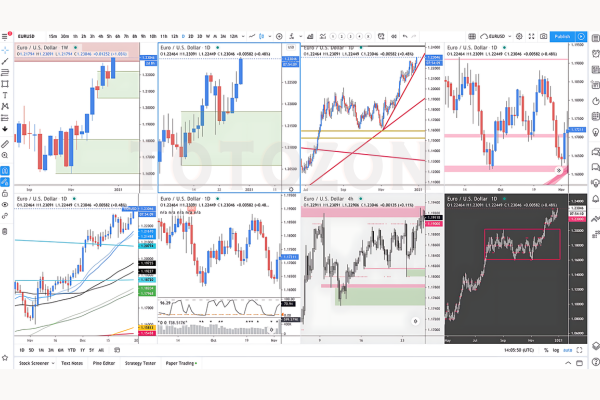 Supply And Demand Zone Trading Course with Trading180
1 × $5.00
Supply And Demand Zone Trading Course with Trading180
1 × $5.00 -
×
 The Orderflow Masterclass with PrimeTrading
1 × $17.00
The Orderflow Masterclass with PrimeTrading
1 × $17.00 -
×
 Order flow self-study training program with iMFtracker
1 × $10.00
Order flow self-study training program with iMFtracker
1 × $10.00 -
×
 How to Build Fortune. Trading Stock Index Futures with Dennis Minogue
1 × $6.00
How to Build Fortune. Trading Stock Index Futures with Dennis Minogue
1 × $6.00 -
×
 High Probability Trading Using Elliott Wave And Fibonacci Analysis withVic Patel - Forex Training Group
1 × $10.00
High Probability Trading Using Elliott Wave And Fibonacci Analysis withVic Patel - Forex Training Group
1 × $10.00 -
×
 Advanced Spread Trading with Guy Bower - MasterClass Trader
1 × $15.00
Advanced Spread Trading with Guy Bower - MasterClass Trader
1 × $15.00 -
×
 White Phoenix’s The Smart (Money) Approach to Trading with Jayson Casper
1 × $39.00
White Phoenix’s The Smart (Money) Approach to Trading with Jayson Casper
1 × $39.00 -
×
 The Best Option Trading Course with David Jaffee - Best Stock Strategy
1 × $15.00
The Best Option Trading Course with David Jaffee - Best Stock Strategy
1 × $15.00 -
×
 Trading Short TermSame Day Trades Sep 2023 with Dan Sheridan & Mark Fenton - Sheridan Options Mentoring
1 × $31.00
Trading Short TermSame Day Trades Sep 2023 with Dan Sheridan & Mark Fenton - Sheridan Options Mentoring
1 × $31.00 -
×
 Stock Market Crash of 1929 with Aron Abrams
1 × $6.00
Stock Market Crash of 1929 with Aron Abrams
1 × $6.00 -
×
 5 Day Program with Dimitri Wallace - Gold Minds Global
1 × $6.00
5 Day Program with Dimitri Wallace - Gold Minds Global
1 × $6.00 -
×
 The Any Hour Trading System with Markets Mastered
1 × $6.00
The Any Hour Trading System with Markets Mastered
1 × $6.00 -
×
 5-Week Portfolio (No Bonus) - Criticaltrading
1 × $39.00
5-Week Portfolio (No Bonus) - Criticaltrading
1 × $39.00 -
×
 3_8’s to Wealth (Audio 84 MB+ WorkBooks) with Darlene Nelson
1 × $6.00
3_8’s to Wealth (Audio 84 MB+ WorkBooks) with Darlene Nelson
1 × $6.00 -
×
 Ultimate Trading Course with Dodgy's Dungeon
1 × $8.00
Ultimate Trading Course with Dodgy's Dungeon
1 × $8.00 -
×
 Candlestick Charting Explained with Greg Morris
1 × $8.00
Candlestick Charting Explained with Greg Morris
1 × $8.00 -
×
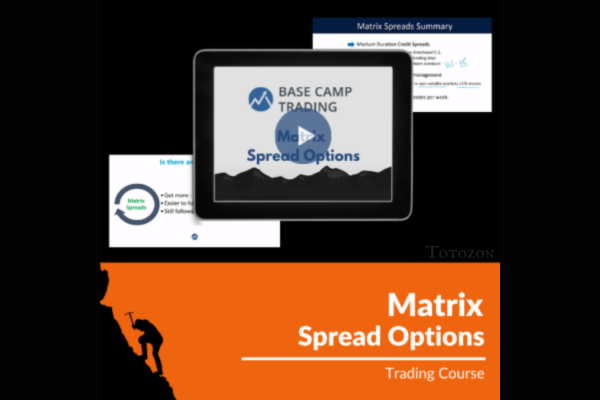 Matrix Spread Options Trading Course with Base Camp Trading
1 × $31.00
Matrix Spread Options Trading Course with Base Camp Trading
1 × $31.00 -
×
 Trading with Wave59 with Earik Beann
1 × $6.00
Trading with Wave59 with Earik Beann
1 × $6.00 -
×
 Butterfly and Condor Workshop with Aeromir
1 × $15.00
Butterfly and Condor Workshop with Aeromir
1 × $15.00 -
×
 WondaFX Signature Strategy with WondaFX
1 × $5.00
WondaFX Signature Strategy with WondaFX
1 × $5.00 -
×
 3 Steps To Supply/Demand + 3 Steps To Market Profile 10% Off Combined Price
1 × $23.00
3 Steps To Supply/Demand + 3 Steps To Market Profile 10% Off Combined Price
1 × $23.00
Opening Range Breakout Indicator for ThinkorSwim
$6.00
File Size: Coming soon!
Delivery Time: 1–12 hours
Media Type: Online Course
You may check content of “Opening Range Breakout Indicator for ThinkorSwim” below:
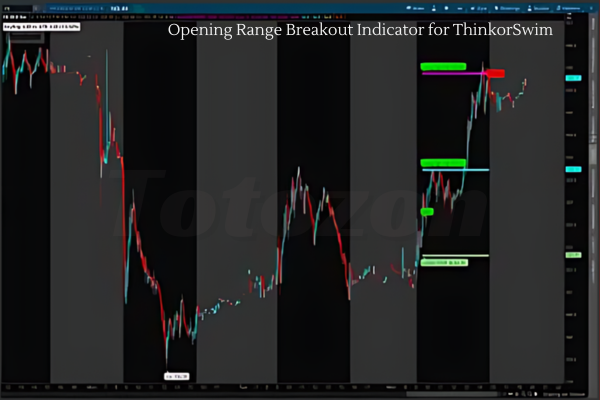
In the world of trading, the Opening Range Breakout (ORB) indicator is a powerful tool that can help you identify potential trading opportunities right at the start of the trading day. This article will explore how to use the ORB indicator on the ThinkorSwim platform, providing you with a step-by-step guide to enhance your trading strategy. Let’s get started!
What is the Opening Range Breakout Indicator?
The Opening Range Breakout indicator identifies the high and low prices during the initial minutes of the trading session. Traders use these levels to predict price movements for the rest of the day.
Why Use the ORB Indicator?
- Early Trading Opportunities: Captures the early momentum of the trading day.
- Clear Entry and Exit Points: Provides specific levels to enter or exit trades.
- Versatility: Applicable to various markets and timeframes.
Setting Up the ORB Indicator on ThinkorSwim
Step 1: Open ThinkorSwim
First, open the ThinkorSwim platform and log into your account.
Step 2: Access the Chart
Navigate to the ‘Charts’ tab to start setting up the ORB indicator.
Step 3: Add the ORB Study
- Click on the ‘Studies’ button at the top of the chart.
- Select ‘Edit Studies’ from the dropdown menu.
- In the ‘Edit Studies’ window, type “Opening Range Breakout” in the search bar.
- Select the ORB study and click ‘Add Selected’ to add it to your chart.
Step 4: Configure the ORB Settings
You can customize the ORB settings based on your trading preferences. Common settings include:
- Time Frame: Set the time frame for the opening range (e.g., first 15 minutes).
- Colors: Choose colors for the high and low lines for better visibility.
Using the ORB Indicator in Your Trading Strategy
Identifying Breakouts
The primary use of the ORB indicator is to identify breakouts. Here’s how you can use it:
Bullish Breakout
- Entry Point: When the price breaks above the opening range high.
- Exit Point: Set a profit target or use a trailing stop-loss to protect gains.
Bearish Breakout
- Entry Point: When the price breaks below the opening range low.
- Exit Point: Similar to bullish breakouts, set a profit target or use a trailing stop-loss.
Combining ORB with Other Indicators
For better accuracy, combine the ORB indicator with other technical indicators:
- Moving Averages: Confirm the trend direction.
- Relative Strength Index (RSI): Identify overbought or oversold conditions.
- Volume: Ensure there is sufficient trading volume to support the breakout.
Backtesting the ORB Strategy
Before implementing the ORB strategy with real money, it’s crucial to backtest it. ThinkorSwim provides tools for backtesting:
- Access OnDemand: Use the OnDemand feature to simulate past trading days.
- Apply the ORB Indicator: Set up the ORB indicator and test different settings.
- Analyze Results: Evaluate the performance of your strategy over various market conditions.
Common Mistakes to Avoid
Ignoring Market Conditions
Market conditions can affect the effectiveness of the ORB strategy. Be mindful of:
- Market News: Significant news events can lead to unpredictable price movements.
- Market Trends: Ensure the overall market trend supports your trade direction.
Overtrading
Opening Range Breakout strategies can generate multiple signals in a day. Avoid overtrading by sticking to your trading plan and only taking high-probability trades.
Enhancing Your ORB Strategy
Using Multiple Time Frames
Analyze multiple time frames to get a broader perspective. For example, use a daily chart to understand the long-term trend and a 5-minute chart for precise entries.
Adjusting to Market Volatility
During volatile market conditions, adjust the ORB settings:
- Wider Ranges: Use a longer opening range period to account for higher volatility.
- Tighter Stops: Use tighter stop-losses to manage risk better.
Practical Tips for Using ORB on ThinkorSwim
- Set Alerts: Configure alerts in ThinkorSwim to notify you when the price breaks the opening range high or low.
- Review Trades: Keep a trading journal to review your ORB trades and identify areas for improvement.
- Stay Disciplined: Stick to your trading plan and avoid emotional trading decisions.
Conclusion
The Opening Range Breakout indicator is a valuable tool for traders looking to capitalize on early market movements. By setting it up on ThinkorSwim and integrating it into a well-thought-out trading strategy, you can enhance your trading performance. Remember to backtest your strategy, stay disciplined, and continuously refine your approach based on market conditions.
Frequently Asked Questions:
- Business Model Innovation:
Embrace our legitimate business model! We organize group buys, allowing participants to share costs for popular courses, making them accessible to those with limited financial resources. Our approach ensures affordability and accessibility, despite author concerns. - The Legal Environment:
The legality of our activity is uncertain. While we lack specific permission from course authors, there’s a technicality: authors didn’t impose resale limits upon course purchase. This presents both an opportunity for us and a benefit for individuals seeking low-cost access. - Quality Control:
Unveiling the Truth
Quality is paramount. Purchasing courses directly from sales pages ensures consistency with traditionally obtained materials. However, we’re not official course providers and don’t offer premium services:
- No scheduled coaching calls or sessions with the author.
- No access to the author’s private Facebook group or web portal.
- No entry to the author’s private membership forum.
- Direct email support from the author or their team is unavailable. Operating independently, we aim to bridge the pricing gap without additional services provided by official channels. Your understanding of our unique approach is valued.
Be the first to review “Opening Range Breakout Indicator for ThinkorSwim”
You must be logged in to post a review.
Related products
Original price was: $4,995.00.$15.00Current price is: $15.00.

Original price was: $197.00.$5.00Current price is: $5.00.

Forex Trading
Original price was: $249.00.$15.00Current price is: $15.00.

Forex Trading
Original price was: $1,098.00.$39.00Current price is: $39.00.

Original price was: $695.00.$41.00Current price is: $41.00.

Forex Trading
Original price was: $4,997.00.$27.00Current price is: $27.00.
Forex Trading
Quantamentals – The Next Great Forefront Of Trading and Investing with Trading Markets
Original price was: $1,495.00.$8.00Current price is: $8.00.
Original price was: $1,849.00.$15.00Current price is: $15.00.
Forex Trading
Original price was: $550.00.$5.00Current price is: $5.00.

Forex Trading
Original price was: $850.00.$23.00Current price is: $23.00.

Forex Trading
Original price was: $2,997.00.$23.00Current price is: $23.00.
Original price was: $139.00.$23.00Current price is: $23.00.

Forex Trading
Original price was: $999.00.$15.00Current price is: $15.00.

Original price was: $999.00.$5.00Current price is: $5.00.

Original price was: $1,200.00.$23.00Current price is: $23.00.

Original price was: $310.00.$23.00Current price is: $23.00.
Forex Trading
Original price was: $797.00.$10.00Current price is: $10.00.
Original price was: $700.00.$39.00Current price is: $39.00.
Forex Trading
Original price was: $500.00.$5.00Current price is: $5.00.
Forex Trading
Original price was: $239.00.$8.00Current price is: $8.00.
Reviews
There are no reviews yet.